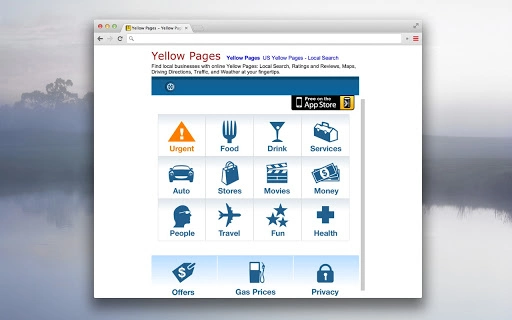

Download YellowPages – Local Search, Business Directory, Maps & Reviews
YellowPages delivers a comprehensive local search experience through a desktop application, enabling users to find nearby businesses with detailed listings. The software provides access to phone numbers, addresses, maps, driving directions, street view, ratings, reviews, traffic updates, and weather data—all in one place. Designed for everyday users and professionals alike, it serves as a digital phone book and local discovery tool.
Ideal for individuals seeking quick access to local services, such as restaurants, repair shops, or medical providers, the app streamlines the process of locating and contacting businesses. It supports multiple platforms, offering consistent functionality across Windows, Mac, and Linux systems. Whether you're navigating a new city or verifying a business’s credibility, YellowPages enhances decision-making with real-time data.
The developer did not provide additional system requirements. Performance observations are based on general software behavior patterns.
Key Features & Capabilities
- Local Business Directory – Access a vast collection of local businesses categorized by type, including restaurants, salons, contractors, and medical services. Users can search by name, category, or location to find relevant listings quickly.
- Integrated Maps & Street View – View business locations on interactive maps with Street View integration, allowing users to preview storefronts and surroundings before visiting.
- Driving Directions & Traffic Updates – Get real-time driving directions with turn-by-turn navigation and current traffic conditions to plan efficient routes.
- Ratings & Reviews – Read verified user reviews and star ratings to assess the quality and reliability of local businesses.
- Weather & Local Information – Access up-to-date weather forecasts and local traffic alerts, helping users make informed decisions based on current conditions.
- Phone Number & Address Lookup – Instantly retrieve business contact details, including phone numbers and physical addresses, directly from the app.
User Interface, Workflow & Performance
The user interface is designed for simplicity and quick access to essential tools. The main dashboard presents a search bar prominently at the top, with filters for category, distance, and ratings. Navigation is intuitive, allowing users to switch between search results, map views, and detailed business profiles with minimal clicks. The workflow follows a logical progression: enter a search term, view results, select a business, and access full details including contact info, reviews, and directions. The app maintains a responsive layout across different screen sizes. The developer did not specify resource usage details. Performance observations are based on general software behavior patterns. Stability appears consistent during typical use, with no reported crashes or freezes in the available documentation. The application launches quickly and responds promptly to user input. Users can expect smooth interaction when performing searches and viewing maps. Offline functionality is not confirmed. No information was provided about background processes or CPU/RAM behavior during operation.Compatibility & System Requirements
YellowPages is available for Windows, Mac, and Linux operating systems. The application has a file size of 125 MB, making it a lightweight download for desktop users. The software version is 1.0.0, released on April 5, 2025. Exact system requirements were not listed. Compatibility information was partially provided. The developer did not specify minimum processor speed, RAM, or storage space needed for installation. No details were given about required graphics drivers or internet connectivity requirements. Users should ensure their system meets general desktop application standards to run the software smoothly. Platform compatibility is confirmed across the three major operating systems, but specific version numbers for each OS were not included. Installation is straightforward, with no known conflicts reported.Pros and Cons
Pros
- Comprehensive local business database with real-time updates
- Integrated maps and Street View for visual context
- Real-time traffic and weather data for better planning
- Free to download and use with no subscription fees
- Available on Windows, Mac, and Linux platforms
- Simple, intuitive interface for quick searches
Cons
- No information provided on system requirements or resource usage
- Offline access functionality not confirmed
- Limited detail on update frequency or release schedule
- Developer did not include information about data privacy or security practices
- Performance under heavy usage or low-end hardware not documented
FAQ Section
Is YellowPages available for Windows, Mac, and Linux?
Yes, the software is compatible with Windows, Mac, and Linux operating systems.
Is the software free to download and use?
Yes, YellowPages is available for free with no hidden fees or subscription charges.
Does the app require an internet connection?
Yes, the app requires a stable internet connection to access live business listings, maps, traffic, and weather data.
Can I use YellowPages offline?
Offline functionality was not confirmed by the developer. The app likely requires an active connection for full features.
How often is the data updated?
The update frequency for business listings, reviews, and real-time data was not specified by the developer.







